

Allocations and central payments
G/L allocation across companies
Allocate income and expenses to other companies, with balanced intercompany postings.
What it does
Head office allocates an amount to subsidiaries, choosing each receiver's account; the same receiver may appear on several lines. "Due from" and "due to" postings are made in every company.
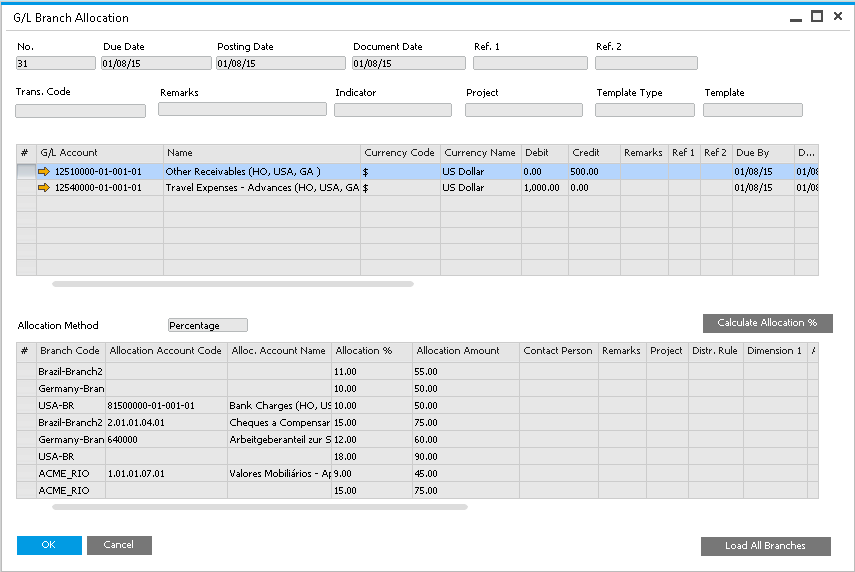
How it works
- In the sending company, open Financials › G/L Branch Allocation and fill in "Due Date", "Posting Date" and "Document Date"; the header applies to every line.
- In the top table, enter each G/L account to share out, its currency and the amount: a credit for an expense allocation, a debit for an income allocation. Add more lines as needed.
- Select a top line, choose "Amount" or "Percentage" as the "Allocation Method", and list its receivers in the lower table by "IC Branch Code" ("Load All Branches" adds every company). A receiver may appear on more than one row, each with its own "Allocation Account".
- Choose "Add". The sender gets one journal entry per top line, balanced against the due-from account of each receiver for a credit, or the due-to account for a debit.
- Each receiver gets a journal voucher or a journal entry: for an expense, the due-to account for the sender against an expense account; for income, the due-from account against an income account.
- The sender's lower table then shows each receiver's status, "Confirmed", and the receiver's entry number and date.
Set it up
In every company, "Branch Accounts Setup" (Administration › Setup › Intercompany › Branch Accounts Setup) holds a due-from and a due-to account for each other company, and "Default Accounts Setup" (Administration › Setup › Intercompany › Default Accounts Setup) the fallback expense and income accounts and a rounding account with its limit. "Receive G/L Allocation as" in "General Settings" decides whether a receiver gets a journal voucher (the default) or a posted journal entry. The receiving account is chosen in this order: the allocation account named on the row; an account matched by classification and type in "Default Accounts by Profit & Loss" or "Default Accounts by Balance Sheet"; then the default expense or income account.
Since: Version 50 (November 2023): the G/L allocation screens respond faster. Version 54 (April 2025): a choose-from-list button on the "Template" field.
Good to know
- Lower-table percentages may not exceed 100 in total, nor amounts the top line. "Residual to Rounding" moves whatever is left over to the rounding account.
- The receivers' allocation accounts reach the sender on a daily or weekly schedule (Administration Console › Preferences › Allocation Acct Scheduling), or at once with "Sync" under Administration › System Initialization › Company Details › Accounting Data.
- From 2.0 PL30 the lower table may also name branches of the sender's own company.