

Financial consolidation
Consolidate different charts of accounts and currencies
Companies with their own account structures and local currencies consolidate into one.
What it does
Each subsidiary's accounts are mapped to the consolidation company's chart; amounts are translated from local currencies.
How it works
- In the consolidation company, build the group's chart of accounts in SAP Business One's "Chart of Accounts" window, shaped by what the group must report, for the authorities or for management. It does not depend on the subsidiaries' charts, and none of its accounts may be a control account.
- Open "Chart of Account Distribution" in the consolidation company. "Export" sends the chart to the B1i server; on the "Import" tab, pick each subsidiary in turn, or All, and choose "Import". "Status" shows how each step went.
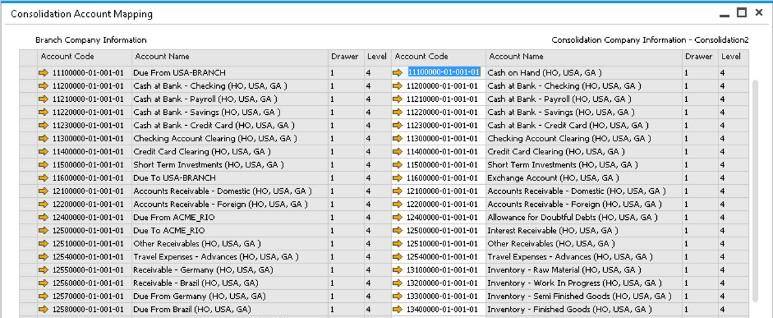
- In every subsidiary, open "Consolidation Account Mapping" and give each active G/L account an active account of the group's chart. All active accounts in all drawers must be mapped.
- Where a subsidiary's chart is built like the group's, "Auto Map Account" fills the mapping for you. Otherwise use the Microsoft Excel tool: "Prepare Template", fill only the "Consolidation Account Code" column on the subsidiary's sheet, then "Validate" and "Upload".
- For currencies, the group works in the consolidation company's local currency. Each subsidiary sends its figures in its local or its system currency, as its "Consolidation Source" says, and accounts are translated where the currencies differ.
Set it up
The paths are Administration › Setup › Intercompany › Chart of Account Distribution (consolidation company only) and Administration › Intercompany Tools › Consolidation Account Mapping Tool. Users in a subsidiary can read the group's chart, but not change it, under Consolidation › Consolidation Chart of Accounts. In the consolidation company, the "Consolidation Accounts Setup" window under Administration › Setup › Intercompany names the accounts for exchange-rate gains, for exchange-rate losses and for rounding residues.
Since: Version 2.0 PL 23 (June 2017): Intercompany can add any currency a company lacks, so every company in the landscape holds the full set.
Good to know
- After any change to the group's chart, export and import it again.
- A subsidiary that reports into more than one consolidation company is asked which one before its mapping opens.
- The administration console's "Copy Intercompany Setups" can copy a mapping to other companies that report into the same consolidation company; key mapping must be finished first.
- Every branch and consolidation company needs the same currencies.
Also in Financial consolidation
- Multi-level consolidation that follows your structure
- Historical, closing or average rates
- Minority interests in the group's accounts
- Journal vouchers in the consolidation
- Projects and transaction codes for group reporting
- Consolidation on a schedule
- Find what must be eliminated
- Export and import consolidation data