

Group reports and control
What the companies owe each other
One view of every amount owed between the group's companies.
What it does
Payables and receivables from intercompany trade, for all companies.
When you need it: Month-end check of due-to and due-from balances.
How it works
- Open Financials › Financial Reports › Branch Balances.
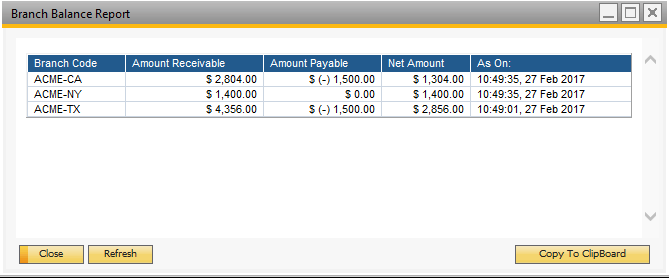
- In "Branch Balances" choose "Local" for the current company's receivables and payables towards the other branch companies, or "Global" to gather those of all branch companies.
- Choose "OK". The local view opens with its figures; in the global view, choose "Refresh" to load them.
- Each line shows a company with its amount receivable, amount payable and the net amount. In the global view each company's line also carries the time its figures were read.
Set it up
The figures rest on Administration › Setup › Intercompany › Branch Accounts Setup, which has to be done in every branch company. With separate accounts in "Due From" and "Due To", receivables take the customer account plus the "Due From" account, and payables the vendor account plus the "Due To" account. With one account in both fields, receivables take the customer account plus that shared account, and payables only the vendor account.
Since: Version 50 (November 2023): "Export to CSV" for the global view of this report.
Good to know
- Both branch accounts must be "All Currencies" accounts.
- The same Branch Accounts Setup also drives G/L allocations, A/P and A/R service invoice allocations and centralised payments, so a gap there affects those features as well.
- "Branch Account Code Generator", in the same menu, can create the two branch accounts and enter them for you.
- The CSV export covers the global view.