

Administration and health check
Key mapping between companies
Map the codes that differ from company to company.
What it does
Currencies, groups and other codes are mapped so documents and master data land correctly.
When you need it: One company calls the euro "EUR", another "EURO".
How it works
- Harmonise first. For every master that is key-mapped, make sure each company holds the same records, so the counts match; add what is missing by hand.
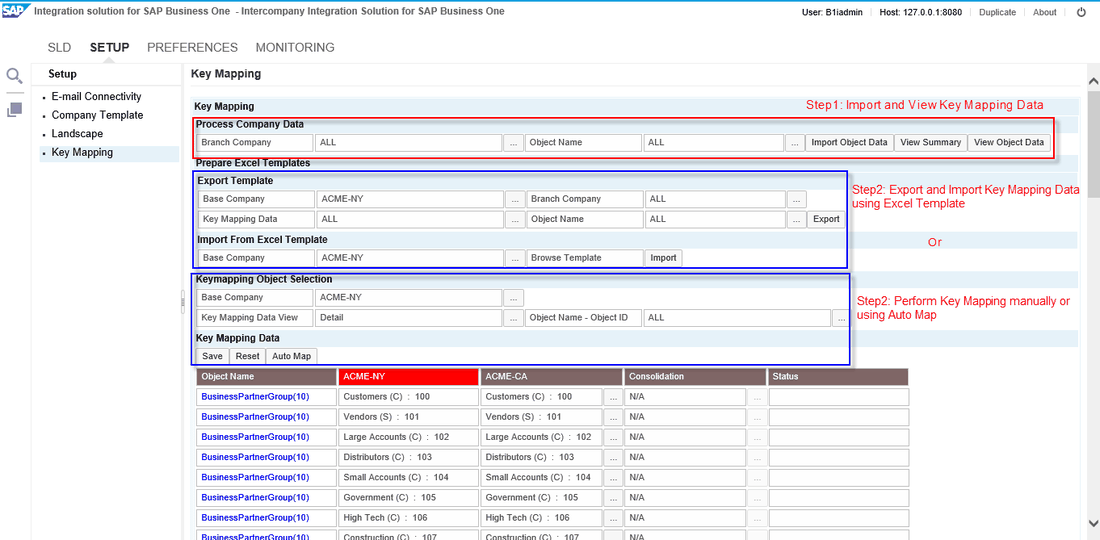
- In the console open Setup › Key Mapping. Under "Process Company Data" choose one company or ALL and one object or ALL, then press "Import Object Data". "View Summary" shows each object as Consistent or Inconsistent across the companies.
- Under "Keymapping Object Selection" choose a "Base Company" (the head office is proposed), the Detail view and an object. The table shows the base company's records; for every other company pick the record that matches, or press "AutoMap" to pair records whose display keys agree and finish the rest by hand.
- Press "Save". After the currency master, the "Configure Currency Details" window opens; check that every branch and consolidation company now has its currencies in step.
- With many companies or records, use Microsoft Excel instead: export the template, give rows that belong together the same value in the "MappingKey" column, and import it. Rows with problems come back with the reason in the "Error" column.
Set it up
Everything sits on the one console page Setup › Key Mapping: import, summaries, manual mapping and the Excel export and import. Run "AutoMap" one object at a time rather than for ALL. When a group mixes localisations and one company runs the Brazil localisation, the guide advises a Brazil company as the base.
Since: Version 52 (July 2024): "Delete Keymapping" under Preferences removes damaged mappings for one object or all.
Good to know
- Why it is needed: objects such as freight, length and width units, weight units, payment terms and item groups carry an internal key that differs from the one on screen, and the keys depend on the order in which records were entered.
- Mapping is done once, at deployment. Afterwards a new record, say a new item group, is replicated and mapped by Intercompany itself.
- Map again when a company template switches on a further key-mapped master, when a company joins, and for currencies after each deployment.
- A group that uses only consolidation maps the currency master alone.
- Key-mapped descriptions must not contain special characters, and no mapping value in the Excel template may start with a hyphen.
Video
Key mapping between companiesVideo · YouTube
Also in Administration and health check
- Landscapes: the group, set up as one
- Companies on many servers
- Intercompany with MultiBranch
- Implementation and copy wizards
- Every message between companies, logged
- An email when something fails
- The cockpit: everything on one screen
- The system health check
- A support ticket from inside Intercompany
- Licence reports and your own wording