

Intercompany trade
Accept or reject incoming documents
The receiving company decides what it accepts; the sender is told.
What it does
Incoming intercompany documents wait for the receiving company's decision. Accept, and a user can add the document; reject, and the sender is notified with the decision.
When you need it: A subsidiary receives an invoice it did not expect and rejects it before it is posted.
How it works
- An incoming intercompany document arrives in draft form, owned by the B1i user.
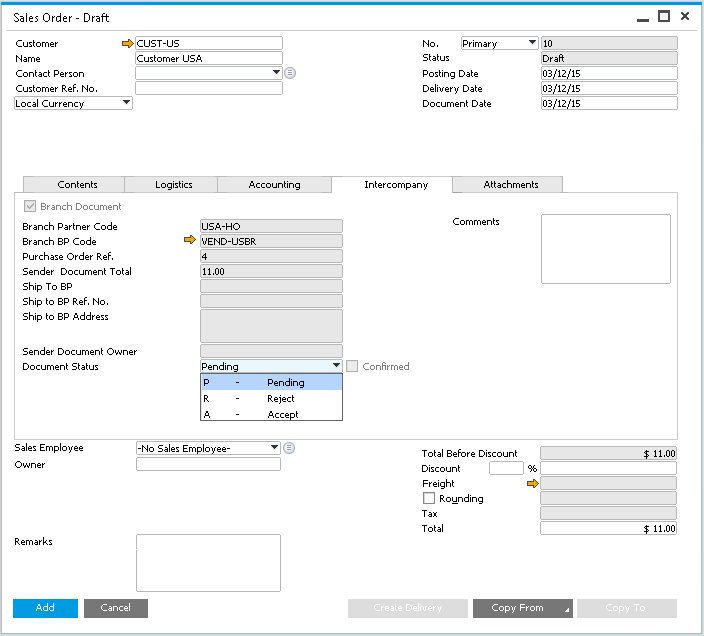
- A user opens the draft. On the "Intercompany" tab, "Document Status" reads Pending, Accept or Reject, next to the sender's document number, total and owner.
- To accept, the user sets Accept and adds the draft as a firm document; the document cannot be added without Accept.
- To reject, the user sets Reject. Intercompany closes the draft and creates a cancellation of the sender's document.
- The sender follows the outcome on its own document: the receiver's status shows there, and "Confirmed" is ticked once the receiver has posted.
Set it up
The starting status of incoming documents is set under Administration › Setup › Intercompany › General Settings, field "Default Status for Marketing Documents". Accept is preselected and can be changed to Pending. To work through what is waiting, run Financials › Financial Reports › Un-posted Intercompany Transactions, filtered by company or left open for all companies.
Good to know
- The status can be changed only while the document is a draft.
- For pairs set to direct creation as firm documents, documents whose totals match are created firm and skip the draft step.
- The workflow tells the sender company what was decided; who receives alerts and emails is set in Intercompany Alerts Administration.
- Receiving users find the waiting drafts by choosing the B1i user in the "Draft Documents" window.
- Administrators see the count of waiting documents across all companies on the "Unposted Marketing Document" tile of the cockpit in the Administration Console, and can open the detail from there.
Also in Intercompany trade
- Every sales and purchasing document, mirrored
- Country-specific documents between your companies
- Service documents, with the right expense account
- Serial and batch numbers carried across
- Cancel once, in both companies
- Stop work on documents not yet approved
- Real-time notifications, with the original attached
- Totals and tax compared between companies
- Tax codes copied when they match
- Drafts or firm documents: your choice